 Time is Money
Faster GitHub Actions
TLDR: The following optimizations made our e2e tests workflow 10x faster. Optimizations included faster tests, more parallelization and more caching.
During the development of BärGPT, we reached a point where our GitHub e2e test workflow would take over 1 hour to complete. On top of that, the tests were often flaky, which made it even harder to work with. At that point I was fed up and decided to look into it. I was thinking, there surely must be room for improvement? Oh boy.
After investigating, I discovered that there were two main bottlenecks:
- Inefficient tests: UI-based login/registration fixtures were very slow.
- Inefficient workflow: sequential and uncached steps wasted time.
Here’s an example todo app that has a similar stack as BärGPT (but simplified) to illustrate how everything works: https://github.com/raphael-arce/fast-gh-actions
Stack:
- Todo App (React/Vite)
- Supabase as a DB/Auth provider
- Playwright as e2e testing framework
Below you’ll find a screenshot of a workflow run before any optimizations, it took 10 minutes. It includes 17 e2e tests, which are run against 3 browsers (Chromium, Firefox and Safari), making it a total of 51 tests. All the job setup steps (installing dependencies, Supabase and Playwright browsers) together took ~5 minutes and 30 seconds and running the tests took ~4 minutes and 30 seconds.
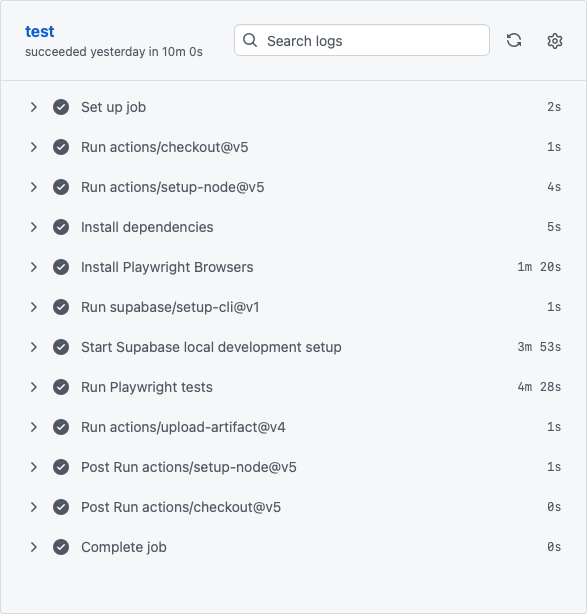
Figure 1: Slow workflow before optimization
Mocking for Speed: Bypassing the UI
Initially we used test fixtures that would register and login users via the UI, just like a real user would do. Most tests needed this logged-in state before actually starting to test a particular feature. This was extremely slow: On a Mac Mini M4, both fixtures would take ~3.5 seconds and would be needed for almost every test. In the GitHub Actions it was even slower.
In the example todo app, it would look like this:
Registration and login fixture
I realized that apart from the registration test and the login test, other tests don‘t need to register / login via the UI. You can register a user via the supabase-js library (as admin), but also log in via the supabase-js library, which will return a session token (as JWT). You can then inject that JWT into test page’s local storage. When the test runs, the app will read that local storage to check if there is an active session (exactly how it would do it in reality). If there is one, you‘ll be logged in the same way as if you would do it via the UI. In case you’re curious how it works here are the fixtures: register fixture and login fixture.
This brings down the fixtures duration from ~3.5 seconds to ~0.3 seconds (!).
Note: For BärGPT, we also used fixtures to upload documents for testing features dependent on uploaded files. However, this approach was slow. Each upload triggered the full process: file upload, content extraction, chunking, and embeddings generation. It was also unreliable, as third-party services occasionally failed, which we tried to avoid with test retries that further delayed tests (IMO, retries should be avoided, but that’s a topic for another time). For tests not focused on the upload/processing itself, I replaced these fixtures with mocks using fixed values. This change cut BärGPT’s end-to-end test time from over an hour to about 20 minutes.
Parallelization: The Key to Faster Workflows
In our Todo App, every run would proceed as following:
- Checkout repository
- Install node
- Install dependencies
- Install Playwright browsers (1 min 20 sec)
- Install Supabase (3 min 53 sec)
- Run e2e tests (4 min 28 sec)
One thing you can optimize is to cache as much as possible. You can cache npm dependencies, builds etc. For this the example Todo App it does not improve times much, as they weren’t many dependencies or the build was not that long. Yet, for larger projects it’s usually worth looking into it.
The installations of Playwright browsers and Supabase were annoyingly slow. Playwright does not recommend to cache the browsers, and caching Supabase does not bring much, as restoring it from a cache takes as long as downloading it from scratch.
However! There is another way to speed up things: parallelization. You don’t need to run each step sequentially in your workflow. Instead, you can start it and run it in the background. For the installations of Playwright browsers and Supabase, they’re mainly network operations and not CPU intensive, so running them in parallel in the background saves a lot of time. Important: if you do this, you’ll need an extra step to make sure the installations are done before the tests start.
Another small optimization for installing Supabase is to use the --exclude flag. That way, you can exclude services that are not needed for your tests.
Once you realize that you can run things in parallel, you start thinking if there is more you can parallelize. Could we run e2e tests in parallel inside the same workflow, e.g. with multiple workers? Unfortunately, Playwright does not recommend it for CI environments: stability and reproducibility should be prioritized. Using more workers in CI environments might lead to performance issues and make tests flaky.
After further research, I stumbled upon GitHub Actions’ matrix feature: you can create variations of a job in your workflow.
By adding a matrix to our e2e tests workflow, we can split up the tests over multiple jobs, and run them in parallel. For example: we add a matrix to our workflow that uses browsers names (‘chromium’, ‘firefox’, ‘webkit’) as job variation, and execute our e2e tests on this browser with the --project <browserName> flag. You could add even more parallelism with sharding.
The disadvantage with this approach is that you’ll run the job setup (installing dependencies, supabase, playwright browsers etc.) for each job variation. Running too many job variations at the same time will significantly increase the total billed minutes. Finding a balance is key.
In our case, I think the sweet spot is to use browsers as job variations. This also allows you to only install the browser currently needed for the job variation, instead of all browsers, which saves some time. Another perk you get is that you can now see which browser is slower or which you are currently waiting for (spoiler: it’s usually Safari).
By applying all these optimizations, we can bring down the workflow time from 10 minutes to 3 minutes and 49 seconds. Here is a screenshot of the chromium workflow with timings:
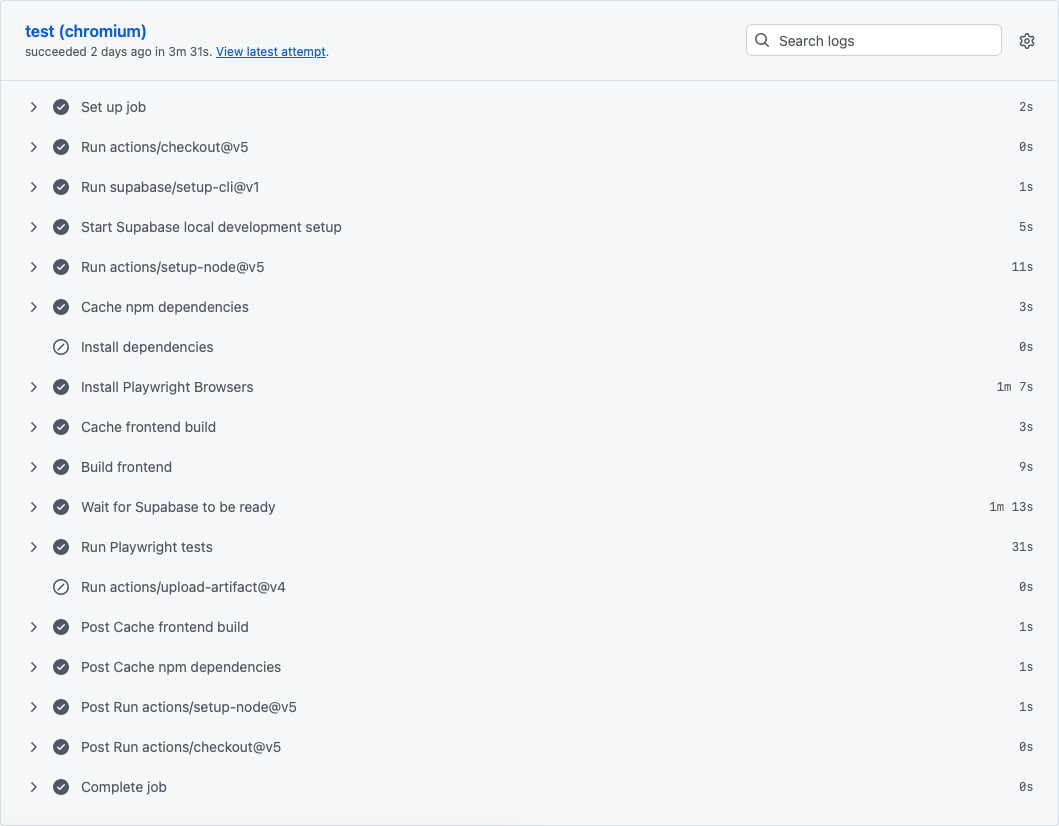
Notice how we went from 5 minutes and 30 seconds to ~3 minutes for the job setup. The tests themselves went down from 4 minutes and 30 seconds to ~30 seconds (!).
Note: keep in mind this was just the workflow for chromium. Firefox took ~3 minutes and Webkit (Safari) took 3 minutes and 47 seconds. But since they were running in parallel, they’re done at almost the same time. Also important to note, is that the total billed time is higher than before: pre-optimization 10 minutes, post-optimizations 10 minutes and 18 seconds.
When we applied these optimizations for BärGPT, we got to down from over 1 hour runs to max 7 minutes per workflow. That was a great relief!
Bonus - Pushing limits
You could try out using bun. I tried it for the example todo app, but it did not make the workflow any faster. I tried it in another project with much more and bigger dependencies and the raw bun install was faster than restoring dependencies from a cache. Very impressive.
You could use a bigger/faster machine. I was often reading about self-hosted runners and feared that would be too much of a hassle to set this up. But after trying it out, I saw how dead simple it was. In addition, the job setup duration was still bothering me. I was thinking why can’t we simply pre-install everything we need on a VM/Docker Image and spin that up?
Then it hit me: what if I pre-install everything the workflow needs on a self-hosted runner and avoid a re-installation everytime we run tests? After all, the installation of dependencies (dependencies, supabase, playwright browsers) is what takes most of the time for each run.
After experimenting a bit, it worked, but you need a bit of tweaking. Running the e2e tests in a matrix with different job variations will need an own machine for each job variation. If you have only one self-hosted runner, the runs will be sequential again and no longer in parallel. But if you have multiple self-hosted runners, it greatly reduces the run time.
I was thinking, well if I run it on a bigger/faster machine, I don’t need to limit myself to the playwright recommendation of 1 worker in CI environments. I can remove the job matrix and increase the amount of workers.
If we apply these tweaks to the todo app workflow (using a mac mini m4 for the self-hosted runner), and obviously it then was blazingly fast: the whole workflow would run in 41 seconds (!), here is a screenshot of the results:

Job setup/teardown only took a few seconds and the tests run in 17 seconds thanks to multiple workers. Overall, it’s very pleasing to see.
Unfortunately, there are drawbacks to this approach. Not installing everything from scratch every time might cause reproducibility issues, e.g. when you have an unnoticed version mismatch and your CI environment suddenly behaves differently than it should. Another drawback is that you might not have a powerful machine that you can afford to leave idle between runs (which probably will be most of the time). We decided to not use self-hosted runners for now for BärGPT because of these drawbacks.
Conclusion
In my opinion, since every project is different, you should weigh the benefits against the potential drawbacks before deciding whether or which optimizations to adopt. But trying (and succeeding!) to optimize can be very satisfying. Try them out for your own workflow! 🚀